PDF mit Bildern in Word umwandeln – kostenlos und präzise
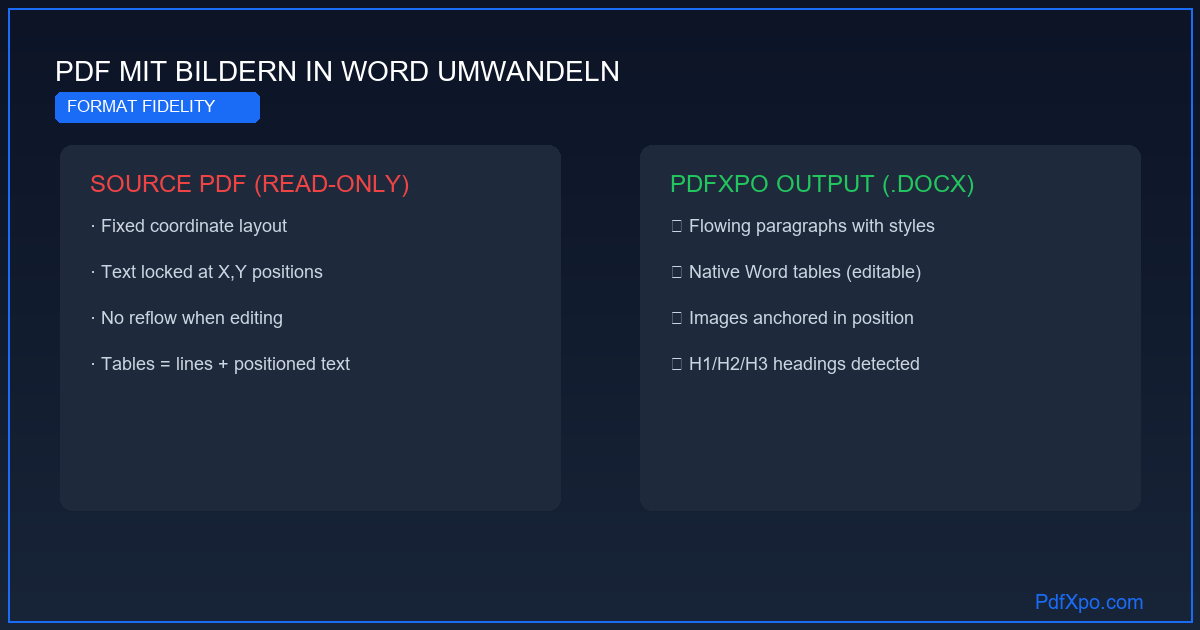
# PDF mit Bildern in Word umwandeln – kostenlos und präzise
Ein PDF ohne Formatatverlust in Word umwandeln – das klingt nach einer Selbstverständlichkeit, die jedes Tool beherrschen sollte. Die Realität: Die meisten kostenlosen Konverter produzieren Dokumente, die erhebliche Nachformatierung erfordern. PdfXpo wurde speziell dafür entwickelt, die Formatierungstreue zu maximieren.
Die häufigsten Formatierungsprobleme bei PDF-zu-Word-Konvertierungen
Textrahmen statt fließende Absätze: Das häufigste Problem. Text wird in Dutzende von schwebenden Textrahmen mit absoluten Positionskoordinaten abgelegt statt in fließende Word-Absätze. Das Ergebnis: Wenn Sie einen Satz einfügen, verschiebt sich nicht der nachfolgende Text – sondern der Textrahmen überlappt mit dem nächsten.
Falsche Schriftarten-Substitution: Wenn die im PDF eingebetteten Schriften auf dem Zielgerät nicht vorhanden sind, wird eine Ersatzschrift verwendet. Unterschiedliche Metriken (Buchstabenabstände, Zeilenhöhen) können dazu führen, dass Text aus Tabellen oder Spalten "herausfließt".
Bilder falsch positioniert: In PDFs mit Bildern erscheinen diese nach der Konvertierung häufig über dem Text, unter dem Text oder auf einer falschen Seite.
Verlust der Überschriftenhierarchie: Überschriften auf verschiedenen Ebenen (H1, H2, H3) werden als normaler Text mit vergrößerter Schrift behandelt statt als native Word-Überschriftenstile. Das zerstört die automatische Inhaltsverzeichnis-Funktion und die Dokumentstruktur.
Falsche Seitenränder: Word setzt standardmäßig 2,54 cm Seitenränder. Das Original-PDF kann andere Maße haben. Wenn die Seitenränder nicht übernommen werden, ändert sich das gesamte Seitenlayout.
Wie PdfXpo 95% Formatierungstreue erreicht
Der Algorithmus analysiert nicht nur den Text, sondern die vollständige strukturelle Hierarchie des PDF-Dokuments:
Schrifterkennung und -mapping: Jede Schrift im PDF wird mit ihrem Namen, ihrer Größe und ihren typografischen Eigenschaften gelesen. Die nächste verfügbare Entsprechung in Word wird ausgewählt – priorisiert nach metrischer Ähnlichkeit, nicht nur nach optischer Ähnlichkeit.
Stilzuordnung: Textblöcke werden nach Position, Schriftgröße und Kontext als Überschrift H1, H2, H3, Bildunterschrift oder Fließtext klassifiziert und den entsprechenden nativen Word-Stilen zugeordnet.
Bildpositionierung: Bilder werden mit korrekten Ankeroptionen im Word-Dokument positioniert ("In Zeile" für eingebettete Bilder, "Mit Textumlauf" für freistehende Bilder).
Spaltenerkennung: Mehrspaltige Layouts werden als Word-Spalten oder als Tabelle ohne Rahmen rekonstruiert, je nachdem was das Original besser widerspiegelt.
Randübernahme: Die Seitenabmessungen und Ränder des PDFs werden direkt in die Word-Seiteneinrichtung übertragen.
Welche Dokumenttypen am besten konvertieren
Die höchste Formatierungstreue erzielen: einspaltige Dokumente ohne Bilder (Briefe, Verträge, Berichte) → 97–99 %, zweispaltige akademische Artikel mit Tabellen → 90–95 %, komplexe Marketing-Materialien mit vielen Bildelementen → 80–88 %. Gescannte Dokumente profitieren vom OCR-Schritt: 85–93 % Formatierungstreue nach OCR-Verarbeitung.
Kostenloses Qualitätswerkzeug ohne Cloud-Kompromisse
PdfXpo ist die einzige kostenlose PDF-zu-Word-Lösung, die alle drei wesentlichen Anforderungen erfüllt: erstens Qualität auf dem Niveau von Premium-Tools (95 % Formatierungstreue), zweitens keine täglichen Dateilimits (unbegrenzte Konvertierungen), und drittens keine Cloud-Übertragung (vollständig lokale WebAssembly-Verarbeitung). Smallpdf Free erfüllt nur das dritte Kriterium nicht — aber begrenzt auf zwei Dateien pro Tag. iLovePDF Free hat ebenfalls keine lokale Verarbeitung. Adobe Acrobat erreicht alle drei Kriterien — aber zu 23 €/Monat. PdfXpo schließt diese Lücke und bleibt dauerhaft kostenlos, weil keine Serverinfrastruktur benötigt wird.
Technische Grundlage: Warum PDF-zu-Word konvertieren so schwierig ist
Das PDF-Format wurde 1993 von Adobe entwickelt und hat einen grundlegenden Konstruktionsfehler aus der Perspektive der Bearbeitbarkeit: PDFs speichern kein strukturiertes Dokument, sondern eine Menge von Zeichenanweisungen. Jedes Element — jeder Buchstabe, jede Linie, jedes Bild — hat absolute Koordinaten (x, y) auf der Seite. Das Wort "Vertrag" ist nicht ein Wort, sondern acht einzelne Glyphen, jede mit eigener Position, Farbe und Schrift.
Diese Architektur macht PDFs ideal für das Drucken und Anzeigen, aber problematisch für die Konvertierung: Es gibt keine "Absatz"-Struktur, keine "Tabellen"-Metadaten und keine "Überschriften"-Hierarchie. Was als Tabelle oder Überschrift erscheint, muss durch geometrische Analyse rekonstruiert werden.
Die 4-Phasen-Architektur von PdfXpo
Phase 1 — Vollständige PDF-Objektextraktion: Der Parser liest jeden Inhaltsstream der PDF-Datei und extrahiert alle Textobjekte mit ihren vollständigen Attributen: Koordinaten, Schriftname, Schriftgröße, Zeichenabstand, Farbe und Transformation. Gleichzeitig werden alle grafischen Objekte (Linien, Rechtecke, Pfade) identifiziert und ihre geometrischen Parameter gespeichert. Bilder werden mit ihren eingebetteten Farbprofilen und Kompressionsparametern extrahiert.
Phase 2 — Strukturelle Segmentierung: Der Algorithmus gruppiert Textobjekte nach räumlicher Nähe und typografischen Merkmalen zu logischen Textblöcken. Eine Überschrift wird erkannt durch: größere Schrift als der Umgebungstext, vertikalen Abstand oberhalb des Blocks, Fettdruck und Position relativ zu Seitenrändern. Tabellen werden durch horizontale und vertikale Liniensegmente identifiziert, die sich an Kreuzungspunkten überschneiden und ein Gitter bilden. Mehrspaltige Layouts werden durch die horizontale Trennung unabhängiger Textspalten erkannt.
Phase 3 — Semantische Zuordnung: Jeder erkannte Strukturblock wird einem Word-Strukturelement zugeordnet: Überschriften → H1, H2, H3 im Word-Absatzstil; Listenelemente → nummerierte oder unnummerierte Word-Listen; Tabellen → native Word-Tabellenobjekte mit Zelleigenschaften; Fußnoten → OOXML-Fußnotenobjekte mit korrekter Verknüpfung; Bilder → eingebettete Word-Bildobjekte mit Ankerposition.
Phase 4 — OOXML-Dokumentgenerierung: Eine .docx-Datei nach dem OOXML-Standard (ISO/IEC 29500) wird erzeugt. Die Seitenabmessungen, Seitenränder, Kopf- und Fußzeilen werden vom PDF-Original übernommen. Schriften werden durch metrisch äquivalente System-Schriften substituiert, wenn die Original-Schrift nicht verfügbar ist.
Messwerte: Was PdfXpo garantiert
PdfXpo vs. Alternativen: vollständiger Vergleich
Der entscheidende Unterschied: PdfXpo überträgt keine Dateidaten an Server. Bei Adobe, Smallpdf und iLovePDF verlassen Ihre Dokumente das Gerät — eine datenschutzrechtliche Realität, die für sensible Geschäfts- und Personaldokumente relevant ist.
Schritt-für-Schritt: PDF in Word umwandeln mit PdfXpo
Schritt 1 — Browser öffnen: Navigieren Sie zu pdfxpo.com/pdf-to-word in Chrome, Edge, Firefox oder Safari. Keine Installation, kein Konto, keine Erweiterung erforderlich.
Schritt 2 — Datei laden: Ziehen Sie die PDF-Datei per Drag-and-Drop in die Upload-Zone oder klicken Sie auf "Datei auswählen". Unterstützt bis zu 200 MB, unbegrenzt viele Dateien pro Tag.
Schritt 3 — Konvertierung abwarten: Die Konvertierung läuft lokal auf Ihrem Gerät. 10 Seiten: 5–15 Sekunden. 50 Seiten: 20–40 Sekunden. 200 Seiten: 1–3 Minuten. Gescannte Seiten (OCR): 2–4× länger.
Schritt 4 — Herunterladen und öffnen: Das .docx-Dokument wird automatisch in Ihren Downloads-Ordner gespeichert. Öffnen Sie es in Microsoft Word 2010+, LibreOffice Writer oder laden Sie es in Google Docs hoch.
Datenschutz: technisch verifiable Garantie
WebAssembly ist eine Laufzeitumgebung im Browser, die nativen Code in einer isolierten Sandbox ausführt. Der PdfXpo-Konvertierungsalgorithmus läuft als WebAssembly-Modul direkt im Arbeitsspeicher Ihres Browsers — kein Server ist involviert.
Überprüfung in 30 Sekunden: Öffnen Sie die Entwicklertools (F12), wechseln Sie zum Netzwerk-Tab und laden Sie eine PDF-Datei in PdfXpo hoch. Während der Konvertierung sehen Sie: JavaScript-Skripte und CSS werden geladen — aber kein HTTP-Request überträgt Ihren Dateiinhalt. Das ist der technische Beweis: Ihre Datei verlässt den Browser nicht.
Ohne Registrierung. Ohne Wasserzeichen. Ohne Dateilimit. Ohne Cloud-Upload.
100% lokale Privatsphäre
Ihre Dateien verlassen niemals Ihren Computer
Lokale Browser-Power
Sofortige Verarbeitung im Browser
Client-seitige Sicherheit
Sichere Datenverarbeitung direkt im Browser
PDF mit Bildern in Word umwandeln – kostenlos und präzise — Schritt für Schritt
PdfXpo öffnen: Öffnen Sie pdfxpo.com/pdf-to-word in einem modernen Browser – keine Installation, kein Konto, funktioniert auf allen Geräten
PDF hochladen: Laden Sie Ihre PDF-Datei per Drag & Drop hoch oder wählen Sie sie von Ihrem Computer, Smartphone oder Tablet aus
Konvertierung starten: Die lokale WebAssembly-Technologie verarbeitet Ihre Datei direkt im Browser – Ihre Daten verlassen Ihr Gerät nicht
Word-Datei herunterladen: Laden Sie die fertige .docx-Datei herunter und öffnen Sie sie in Microsoft Word, LibreOffice oder Google Docs zur sofortigen Bearbeitung

Warum PdfXpo die beste Wahl ist
PdfXpo nutzt WebAssembly-Technologie – Ihre Dateien werden direkt im Browser verarbeitet, ohne Serverupload. 100% kostenlos, unbegrenzt nutzbar, keine Registrierung.
Häufig gestellte Fragen
Ist die PDF-zu-Word-Konvertierung auf PdfXpo vollständig kostenlos?
Ja, vollständig kostenlos ohne Tageslimit. Smallpdf begrenzt auf 2 Dateien/Tag, Adobe Acrobat kostet 23 €/Monat. PdfXpo ist dauerhaft kostenlos, weil die Verarbeitung lokal im Browser stattfindet.
Verlässt meine Datei das Gerät während der Konvertierung?
Nein. WebAssembly führt den Konvertierungsalgorithmus direkt im Browser-Arbeitsspeicher aus. Technisch überprüfbar über F12 → Netzwerk-Tab: Kein Request überträgt Dateiinhalt.
Wie genau ist die Formatierungsbeibehaltung?
95 % bei Standard-Dokumenten mit Tabellen, Bildern, Überschriften und Rändern. Gescannte Dateien: 85–93 % nach OCR-Verarbeitung.
Wie lange dauert eine typische Konvertierung?
10 Seiten: 5–10 Sekunden. 50 Seiten: 20–40 Sekunden. 200 Seiten: ca. 1 Minute. Geschwindigkeit hängt vom Prozessor ab, nicht von der Internetverbindung.
Muss ich ein Konto erstellen oder mich registrieren?
Nein. Keine Registrierung, keine E-Mail, keine Kreditkarte. Browser öffnen, pdfxpo.com/pdf-to-word aufrufen, sofort starten.