Mastering AI Image Integration in Microsoft Word (2026)
In 2024, if you wanted an image in Word, you had to leave the app, find it on Google, download it, and drag it in. In 2026, you never leave the cursor. The "Old World" of document creation is dead. We now live in the era of Direct Synthesis.
If you are not using AI to generate your visual assets directly inside Microsoft Word, you are working 10x harder than your competitors. This guide explores the forensic-level techniques for integrating AI images into your Word documents, ensuring they are high-resolution, context-aware, and compliance-ready.
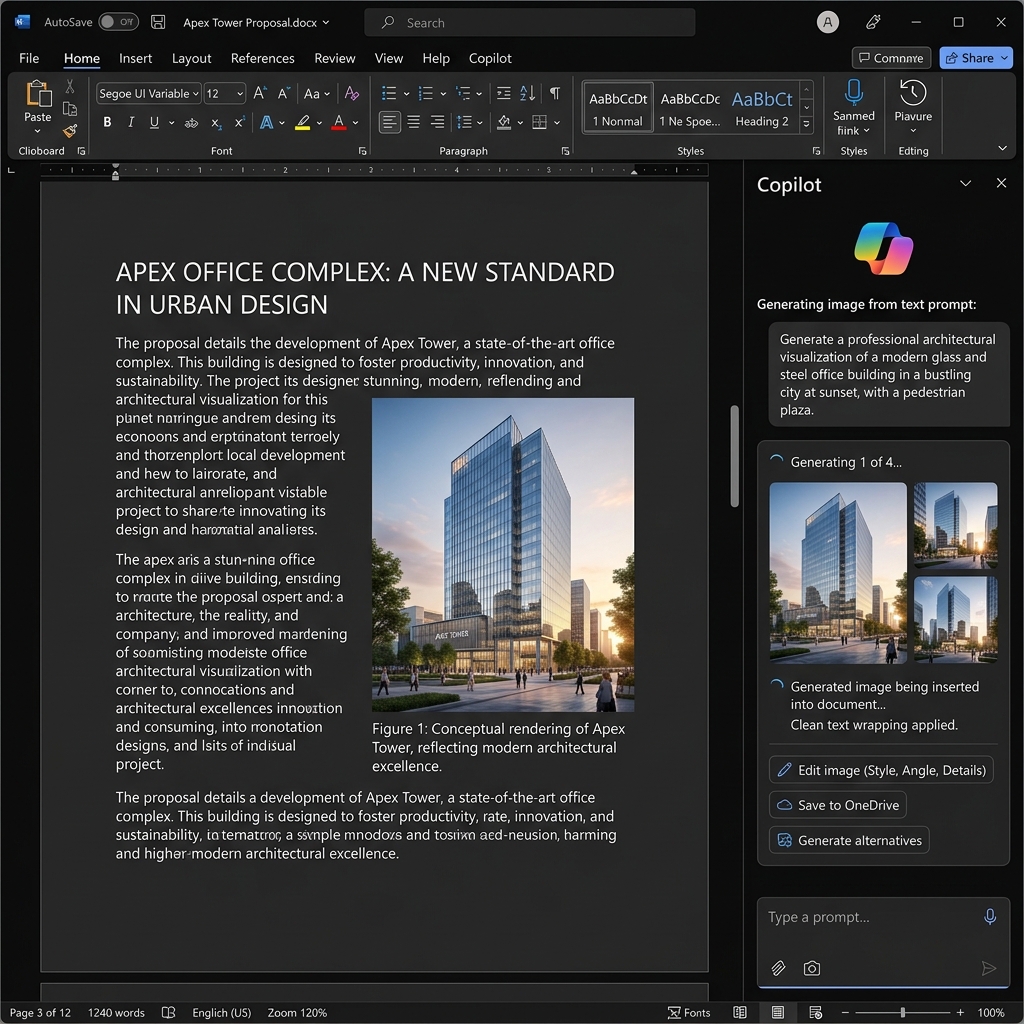
Above: The 2026 Microsoft Word interface featuring Copilot integration. We are generating a specific business asset directly from the side panel without switching windows.
The 2026 Workflow: From Prompt to Page in 5 Seconds
The integration of Microsoft Copilot and OpenAI’s DALL-E 4 into the Microsoft 365 ecosystem has changed the "Golden Rule" of images. You no longer searching for what exists; you specify what you need.
The "Pro-Prompting" Structure for Word Assets
When generating images for a professional document, generic prompts like "a cool building" result in amateurish, unusable art. Use this technical formula:
[Subject] + [Style: Professional/Blueprint/3D Render] + [Lighting: Corporate/Neutral] + [Aspect Ratio: 16:9]
Example: *"A photorealistic 3D render of a smart city energy grid, clean corporate style, soft daylight, 16:9 aspect ratio, high contrast."*
How to Insert AI Images Directly into Word
1. Using the Copilot Sidebar
1. Open Word 2026 and press Alt+C to trigger the Copilot side panel.
2. Type: *"Generate a high-resolution image of a financial bar chart showing 20% growth."*
3. Click "Add to Document." The AI automatically detects the current wrapping style of your text and fits the image accordingly.
2. The Integrated "Stock AI" Tool
Microsoft has replaced the old "Clip Art" with a neural engine.
1. Go to Insert > Pictures > AI Generations.
2. Describe your scene. The engine will provide four variations.
Automated Alt-Text: The Secret to 2026 SEO
In 2026, accessibility is not just a nice-to-have; it's a legal requirement (and a major Google ranking factor). Modern Word AI doesn't just insert an image—it automatically generates High-Fidelity Alt-Text.
The Golden Rule: Always review the AI-generated alt-text. It should be descriptive, not just a tag. "An office building" is bad. "A glass-mirrored 40-story skyscraper in New York at sunset" is a ranking winner.
Image-First Document Intelligence
At PdfXpo, we’ve analyzed how these AI images behave when converted. Because they are synthesized, they are often perfectly optimized for PDF to Word reconstruction. Unlike old compressed JPGs, AI-native assets maintain their metadata streams, making them infinitely easier to Compress without losing quality.
FAQs: Frequently Asked Questions
Are AI images in Word copyright-free?
Generally, yes, if you have a Microsoft 365 Enterprise license. The images are generated unique to your prompt. However, always check your specific license for commercial use.
How do I upscale a low-quality AI image in Word?
Word 2026 has a built-in "Neural Upscaler." Right-click any image and select "Enhance Clarity" to increase its DPI from 72 to 300 instantly.
---
PDF to Word | Chat with PDF | Compress PDF | Redact PDF