Convertir PDF a Word con notas al pie – gratis
# Convertir PDF a Word con notas al pie – gratis
Las notas al pie son uno de los elementos más técnicamente complejos de preservar en la conversión de PDF a Word. Son habituales en documentos académicos, publicaciones científicas, contratos legales con referencias normativas, libros y artículos periodísticos. Perder las notas al pie en una conversión significa perder también las referencias que documentan las afirmaciones del texto principal, lo que puede invalidar el documento desde un punto de vista académico o legal.
Por qué las notas al pie se pierden o se dañan en la conversión
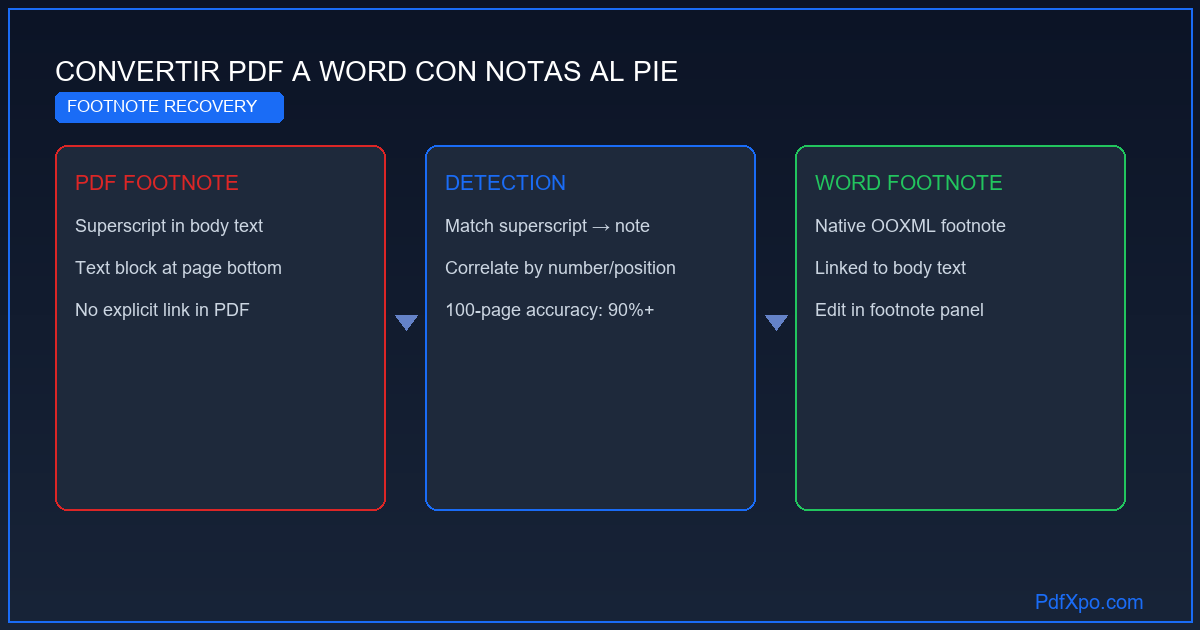
En el formato PDF, las notas al pie se almacenan como bloques de texto situados en la parte inferior de la página, conectados al texto principal únicamente por proximidad visual y por una convención tipográfica (superíndice numérico en el texto, mismo número al inicio de la nota). No existe ningún metadato en el PDF que marque explícitamente "este es el texto de la nota al pie 7 y está vinculada a este superíndice".
La mayoría de convertidores de PDF interpretan las notas al pie como párrafos normales al final de la página, perdiéndose el vínculo entre el número superíndice en el texto y el contenido de la nota. El resultado es un documento Word donde las notas aparecen como texto suelto al final de cada página, sin la estructura de nota al pie nativa de Word.
PdfXpo resuelve esto con un algoritmo de detección de notas al pie que:
- Identifica los superíndices en el texto principal por su posición vertical respecto a la línea base y su tamaño de fuente reducido.
- Correlaciona los números de los superíndices con los bloques de texto en la zona inferior de la página que comienzan con el mismo número.
- Reconstruye las notas al pie nativas de Word usando el objeto `footnote` del estándar OOXML, de modo que aparecen en el panel de notas al pie de Word y están vinculadas al texto principal.
- Mantiene la numeración continua si el documento tiene numeración de notas al pie a lo largo de todo el texto (en lugar de reiniciar en cada página).
Tipos de documentos con notas al pie que PdfXpo maneja bien
Artículos académicos y tesis doctorales: suelen tener notas al pie con referencias bibliográficas en formato APA, Chicago o Vancouver. La preservación del número de nota y el texto de referencia es crítica para mantener la validez académica del documento convertido.
Contratos y documentos legales: los contratos complejos usan notas al pie para referencias normativas ("según lo dispuesto en el artículo 1502 del Código Civil…"), definiciones de términos y aclaraciones. Perder estas notas puede cambiar el significado legal del documento.
Libros y publicaciones editoriales: capítulos de libros académicos con citas bibliográficas extensas, comentarios de autor y referencias cruzadas entre capítulos.
Traducciones juradas: los traductores jurados trabajan habitualmente con PDFs de documentos oficiales que contienen notas al pie con aclaraciones del traductor o del organismo emisor.
Cómo verificar que las notas al pie se han preservado correctamente
Después de convertir, en Microsoft Word: ve a la pestaña Referencias → Insertar nota al pie. Si el documento tiene notas al pie correctamente estructuradas, el panel de notas (en la parte inferior de la pantalla en vista Normal, o en la parte inferior de cada página en vista Diseño de impresión) mostrará el texto de las notas vinculado a los superíndices correspondientes en el texto principal. Si en cambio el texto de las notas aparece como párrafos normales al final de las páginas, la conversión no ha preservado la estructura de notas al pie nativas de Word.
PdfXpo logra una tasa de preservación de notas al pie superior al 90 % en documentos académicos y legales estándar generados desde Word, LaTeX o InDesign.
Cómo PdfXpo convierte tu PDF a Word: proceso técnico en 4 fases
El motor de conversión de PdfXpo sigue un proceso de cuatro fases que garantiza la máxima fidelidad al documento original.
Fase 1 — Análisis estructural: El motor analiza el árbol de objetos internos del PDF para identificar todos los elementos: bloques de texto, imágenes embebidas, vectores gráficos, metadatos de página y cualquier anotación presente. Esta fase determina la jerarquía del documento: qué es un título, qué es un párrafo, qué es el contenido de una celda de tabla.
Fase 2 — Detección de estructura semántica: Usando análisis de proximidad espacial y patrones tipográficos, el motor identifica elementos compuestos: tablas, listas, columnas múltiples, encabezados y pies de página, notas al pie. Esta fase es la más exigente y la que más influye en la calidad del resultado.
Fase 3 — Reconstrucción del flujo de contenido: El contenido identificado se traduce a las estructuras nativas de Word: párrafos con estilos, tablas con celdas, listas con sangría, imágenes ancladas. Las fuentes del PDF se mapean a sus equivalentes en Word.
Fase 4 — Generación del archivo DOCX: Se produce un archivo Word (.docx) completamente compatible con Microsoft Word 2010+, LibreOffice Writer, Google Docs y cualquier aplicación que soporte el estándar OOXML.
Comparativa: PdfXpo frente a Adobe Acrobat, Smallpdf e iLovePDF
La diferencia clave es la privacidad: Adobe, Smallpdf e iLovePDF procesan tus documentos en servidores externos. PdfXpo usa WebAssembly para que la conversión ocurra completamente dentro de tu navegador. Tu archivo nunca sale de tu dispositivo.
Cómo convertir tu PDF a Word: guía paso a paso
Paso 1 — Accede a PdfXpo: Abre tu navegador y ve a pdfxpo.com/pdf-to-word. No necesitas instalar ningún programa, crear ninguna cuenta ni facilitar ningún dato personal.
Paso 2 — Sube el PDF: Arrastra el archivo a la zona de carga o haz clic para seleccionarlo desde tu dispositivo. Los archivos de hasta 200 MB son compatibles. En móvil, puedes seleccionarlo desde la app de Archivos, iCloud, Google Drive o cualquier origen accesible.
Paso 3 — Espera la conversión local: El motor procesa el archivo en tu dispositivo usando WebAssembly. Un PDF de 10 páginas tarda entre 5 y 15 segundos. Uno de 100 páginas puede tardar entre 30 segundos y 2 minutos según la potencia del procesador.
Paso 4 — Descarga el archivo Word: Haz clic en "Descargar" para guardar el archivo .docx. Ábrelo en Microsoft Word, LibreOffice Writer o Google Docs para revisar el resultado y realizar los ajustes necesarios.
Privacidad: tu documento nunca abandona tu dispositivo
La tecnología WebAssembly garantiza que todo el procesamiento ocurre dentro del motor JavaScript de tu navegador, usando la memoria RAM de tu dispositivo. No existe ninguna petición de red que transmita el contenido del archivo a ningún servidor externo. Puedes verificarlo en las Herramientas de Desarrollador (F12 → pestaña Red): durante la conversión no verás ninguna solicitud que lleve los datos de tu documento.
Cuando cierras la pestaña del navegador, todos los datos del archivo procesado se eliminan automáticamente de la memoria. PdfXpo no guarda ninguna copia ni registro de los documentos procesados.
Conclusión
Convertir PDF a Word con precisión y privacidad ya no requiere suscripciones de pago. PdfXpo ofrece conversión ilimitada, completamente gratuita, con privacidad garantizada por diseño y compatible con todos los dispositivos y navegadores modernos. Sin registro. Sin marca de agua. Sin límite de archivos.
Privacidad 100% Local
Tus archivos nunca salen de tu ordenador
Potencia del Navegador Local
Procesamiento Instantáneo en el Navegador
Seguridad en el Cliente
Procesamiento seguro directo en el navegador
Convertir PDF a Word con notas al pie – gratis — Paso a Paso
Abre PdfXpo en tu navegador: Ve a pdfxpo.com/pdf-to-word en cualquier navegador moderno. No necesitas instalar ningún programa ni crear ninguna cuenta.
Sube tu archivo PDF: Arrastra el PDF a la zona de carga o haz clic para seleccionarlo desde tu dispositivo, móvil o tablet.
Espera la conversión local: El motor de PdfXpo procesa el archivo en tu dispositivo usando WebAssembly. Un PDF de 10 páginas tarda entre 5 y 15 segundos.
Descarga el archivo Word: Haz clic en 'Descargar' para guardar el archivo .docx y ábrelo en Microsoft Word, LibreOffice o Google Docs.

¿Por qué elegir PdfXpo?
PdfXpo usa tecnología WebAssembly – tus archivos se convierten directamente en tu navegador, sin enviarlos a ningún servidor. 100% gratis, ilimitado, sin registro.

Preguntas Frecuentes
¿Las notas al pie se convierten en notas al pie nativas de Word?
Sí. PdfXpo detecta los superíndices en el texto principal y los correlaciona con los bloques de texto al pie de la página, reconstruyendo las notas al pie como objetos footnote nativos del estándar OOXML. En Word aparecen en el panel de notas al pie y están vinculadas al texto principal por el superíndice correspondiente.
¿Funciona con documentos académicos en LaTeX con muchas notas al pie?
Sí. Los PDFs generados desde LaTeX tienen una estructura de notas al pie muy regular y predecible, lo que facilita la detección y reconstrucción. La tasa de preservación de notas al pie en PDFs de LaTeX supera el 95 %.
¿Se preserva la numeración continua de notas al pie en documentos largos?
Sí. Cuando el documento tiene numeración continua de notas al pie a lo largo de todo el texto (en lugar de reiniciar en cada página), PdfXpo preserva esa numeración continua en el documento Word resultante.
¿Son seguros mis documentos confidenciales cuando uso PdfXpo?
Tus archivos nunca abandonan tu dispositivo. PdfXpo usa WebAssembly para ejecutar el algoritmo en la memoria RAM de tu navegador. Puedes verificarlo abriendo las Herramientas de Desarrollador (F12 → pestaña Red) durante la conversión: no existe ninguna petición de red que transmita el contenido de tu documento. Ideal para contratos, documentos médicos, declaraciones fiscales y cualquier archivo confidencial.
¿Es completamente gratuita y sin restricciones la conversión de PDF a Word en PdfXpo?
Sí, la conversión es 100 % gratuita y sin ninguna restricción en el número de archivos, el tamaño ni el número de páginas. Smallpdf limita su plan gratuito a dos archivos por día; Adobe Acrobat cuesta 23 €/mes; iLovePDF impone restricciones a los archivos grandes. PdfXpo rechaza ese modelo de negocio porque el procesamiento ocurre en tu dispositivo, eliminando los costes de servidor. No hay marca de agua, no hay límite de páginas y no hay conversiones 'premium' ocultas.