Konversi PDF ke Word lewat Google Docs – gratis
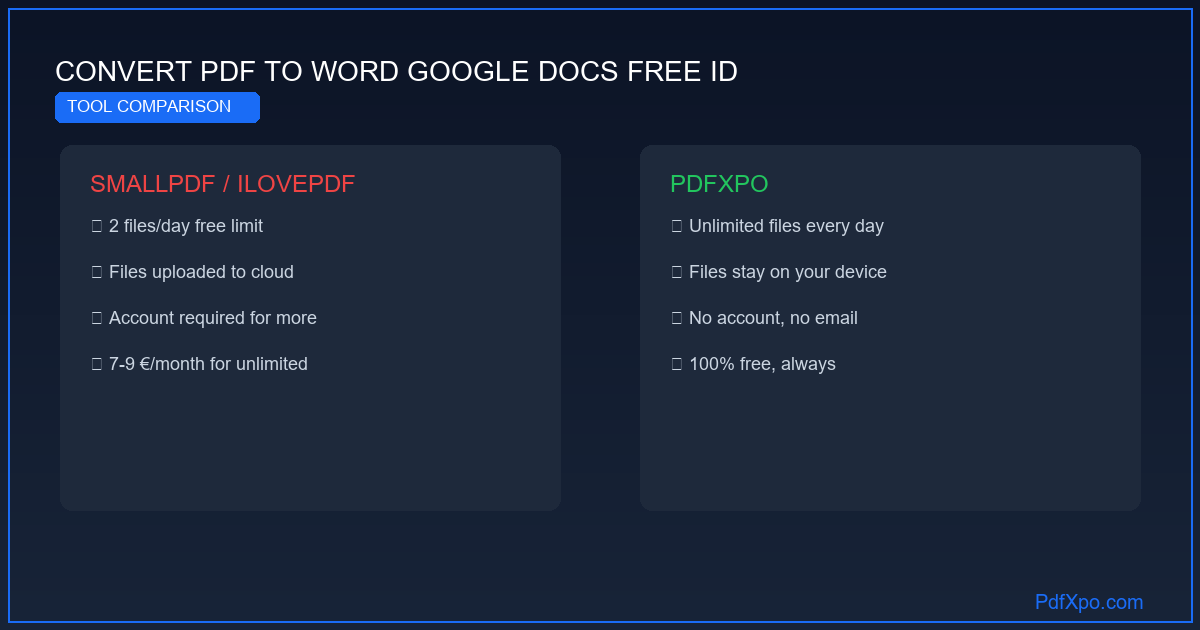
PdfXpo dibanding Adobe, Smallpdf, dan iLovePDF
Jika Anda mencari alternatif Adobe Acrobat, Smallpdf, atau iLovePDF untuk mengonversi PDF ke Word, berikut perbandingan jujur. Tiap alat punya kelebihan, tetapi PdfXpo unggul pada tiga kriteria menentukan: harga, privasi, dan tiadanya batas.
Dibanding Adobe Acrobat
Adobe sedikit lebih akurat (≈97% vs 95%), tetapi berbayar dan mengirim berkas Anda ke servernya. Untuk pemakaian non-institusional, PdfXpo menutup kebutuhan yang sama secara gratis, dengan privasi lebih baik.
Dibanding Smallpdf dan iLovePDF
Layanan ini membatasi konversi gratis (sering 2 per hari), kadang menambah tanda air, dan memproses dokumen Anda di awan. PdfXpo tanpa batas, tanpa tanda air, dan semuanya tetap di perangkat Anda.
Mengapa Google Docs tidak cukup
Membuka PDF di Google Docs «mengonversi» berkas, tetapi sering merusak tata letak — terutama tabel dan kolom — karena mesinnya tidak dibuat untuk kesetiaan struktural. PdfXpo memakai mesin khusus yang menyusun ulang struktur.
Pembeda mendasarnya tetap pemrosesan lokal: dengan PdfXpo, tak ada data yang keluar dari perangkat Anda, yang bisa Anda verifikasi sendiri (F12 → Network). Gratis, tanpa batas, tanpa daftar — coba konversinya sekarang.
Dasar teknis: mengapa konversi PDF ke Word begitu sulit
Format PDF diciptakan Adobe pada 1993 dengan satu batasan mendasar dari sudut pandang penyuntingan: PDF tidak menyimpan dokumen terstruktur, melainkan kumpulan instruksi menggambar. Tiap elemen — tiap huruf, tiap garis, tiap gambar — punya koordinat absolut (x, y) di halaman. Kata «kontrak» bukanlah satu kata, melainkan delapan glif terpisah, masing-masing dengan posisi, warna, dan fontnya sendiri.
Arsitektur ini membuat PDF ideal untuk dicetak dan ditampilkan, tetapi menyulitkan konversi: tak ada struktur «paragraf», tak ada metadata «tabel», tak ada hierarki «judul». Yang tampak sebagai tabel atau judul harus disusun ulang lewat analisis geometri.
Arsitektur 4 fase PdfXpo
Fase 1 — Ekstraksi penuh objek PDF : pengurai membaca tiap aliran isi berkas dan mengekstrak semua objek teks beserta atribut lengkapnya: koordinat, nama font, ukuran, jarak, warna. Bersamaan, objek grafis (garis, persegi, jalur) dikenali, dan gambar diekstrak beserta profil warnanya.
Fase 2 — Segmentasi struktural : algoritme mengelompokkan objek teks berdasarkan kedekatan ruang dan ciri tipografi menjadi blok logis. Judul dikenali dari font lebih besar, jarak lebih lebar, dan posisinya. Tabel dikenali dari segmen garis yang berpotongan membentuk kisi. Tata letak banyak kolom dikenali dari pemisahan horizontal antarkolom.
Fase 3 — Pemetaan semantik : tiap blok struktural dipetakan ke elemen Word: judul → gaya Judul 1/2/3; butir daftar → daftar bernomor atau berpoin Word; tabel → objek tabel native; catatan kaki → objek catatan OOXML yang tertaut benar; gambar → objek gambar berjangkar.
Fase 4 — Pembuatan dokumen OOXML : berkas .docx sesuai standar OOXML (ISO/IEC 29500) dihasilkan. Dimensi halaman, margin, kepala, dan kaki halaman diwarisi dari aslinya. Font yang tak tersedia diganti dengan font yang setara secara metrik.
Pengukuran: yang dijamin PdfXpo
PdfXpo dibanding alternatif
Pembeda menentukannya: PdfXpo tidak mengirimkan data berkas apa pun ke server. Dengan Adobe, Smallpdf, dan iLovePDF, dokumen Anda keluar dari perangkat — kenyataan hukum yang relevan untuk dokumen profesional dan pribadi yang sensitif.
Langkah demi langkah: mengonversi PDF ke Word dengan PdfXpo
Langkah 1 — Buka peramban : kunjungi pdfxpo.com/pdf-to-word di Chrome, Edge, Firefox, atau Safari. Tanpa instalasi, tanpa akun, tanpa ekstensi.
Langkah 2 — Muat berkas : seret PDF ke area unggah atau klik «Pilih berkas». Hingga 200 MB, tanpa batas harian.
Langkah 3 — Tunggu konversi : pemrosesan berjalan lokal. 10 halaman: 5–15 detik. 50 halaman: 20–40 detik. 200 halaman: 1–3 menit. Halaman hasil pindai (OCR): 2–4 kali lebih lama.
Langkah 4 — Unduh dan buka : berkas .docx tersimpan di unduhan Anda. Buka di Microsoft Word 2010+, LibreOffice Writer, atau Google Docs.
Privasi: jaminan yang dapat diverifikasi secara teknis
WebAssembly adalah lingkungan eksekusi di peramban yang menjalankan kode native dalam sandbox terisolasi. Algoritme konversi PdfXpo dijalankan sebagai modul WebAssembly langsung di memori peramban Anda — tak ada server yang terlibat.
Verifikasi dalam 30 detik : buka alat pengembang (F12), tab «Network», lalu muat sebuah PDF di PdfXpo. Selama konversi, Anda akan melihat pemuatan skrip dan lembar gaya — tetapi tak ada permintaan HTTP yang membawa isi berkas Anda. Itulah bukti teknisnya: berkas Anda tak keluar dari peramban.
Kiat agar konversi berhasil
Untuk hasil terbaik, utamakan PDF asli (dibuat dari perangkat lunak) ketimbang pindaian: kesetiaannya maksimal. Jika dokumen berupa pindaian, pindai minimal 200 DPI dan jaga pencahayaan merata agar OCR mengenali tiap karakter dengan benar. Untuk dokumen banyak kolom, periksa urutan kolom setelah konversi; untuk tata letak yang sangat grafis, penyesuaian manual kecil mungkin perlu. Terakhir, biarkan tab terbuka selama memproses berkas besar: konversi berjalan lokal, dan menutup halaman akan menghentikannya. Setelah memperoleh .docx, buka dan telusuri sekilas untuk memastikan formatnya sebelum dipakai.
Kapan konversi PDF ke Word paling dibutuhkan?
Kebutuhan mengonversi muncul dalam banyak situasi sehari-hari. Anda menerima kontrak atau surat dalam PDF dan perlu mengubah satu klausul sebelum menandatanganinya. Anda menemukan templat — CV, proposal, laporan — yang hanya tersedia dalam PDF dan ingin memakainya ulang tanpa mengetik dari nol. Dosen membagikan materi kuliah dalam PDF dan Anda ingin menyalin kutipan ke catatan. Tim Anda mengirim laporan PDF yang datanya harus dimasukkan ke dokumen kerja. Pada semua kasus ini, mengonversi ke Word menghemat waktu berjam-jam dibanding mengetik ulang, sekaligus menjaga tabel, gambar, dan tata letak tetap utuh. PdfXpo membuat langkah ini cepat, gratis, dan privat — tanpa mengirim dokumen Anda ke mana pun.
Kompatibel dengan editor teks apa pun
Berkas .docx yang dihasilkan mengikuti standar OOXML dan terbuka tanpa masalah di Microsoft Word (2010 ke atas), LibreOffice Writer, Google Docs, dan Apple Pages (lewat impor), baik di Windows dan Mac maupun di Linux, Android, dan iOS. Anda tak terkurung pada satu program: edit di mana pun yang paling nyaman, lalu ekspor ulang ke PDF saat selesai. Karena konversi tak menuntut daftar maupun instalasi, alur kerjanya — buka, konversi, edit — hanya butuh beberapa detik dari awal hingga akhir.
Tanpa daftar. Tanpa tanda air. Tanpa batas berkas. Tanpa unggahan ke awan.
100% Local Privacy
Your files never leave your computer
Local Browser Power
Instant Processing in Browser
Secure Client-Side Processing
Data is handled entirely within your browser for maximum security
How to Konversi PDF ke Word lewat Google Docs – gratis — Langkah demi Langkah
Buka PdfXpo: Kunjungi pdfxpo.com/pdf-to-word di peramban modern — tanpa instalasi, tanpa akun, bekerja di semua perangkat.
Unggah PDF: Seret PDF atau klik 'Pilih berkas'. PDF asli maupun hasil pindai diterima, hingga 200 MB.
Mulai konversi: Teknologi WebAssembly memproses berkas secara lokal di peramban — data Anda tak pernah keluar dari perangkat.
Unduh berkas Word: Dalam hitungan detik, .docx siap. Buka di Word, LibreOffice, atau Google Docs dan edit dengan bebas.

Mengapa memilih PdfXpo?
PdfXpo memakai teknologi WebAssembly – berkas Anda diproses langsung di peramban, tanpa kirim ke server. 100% gratis, tanpa batas, tanpa daftar.

Pertanyaan Umum
Mengapa PdfXpo lebih baik dari Adobe Acrobat untuk konversi?
Adobe sedikit lebih akurat (≈97% vs 95%) tetapi berbayar dan mengirim berkas Anda ke servernya. Untuk pemakaian non-institusional, PdfXpo menutup kebutuhan yang sama secara gratis, dengan privasi lebih baik berkat pemrosesan lokal.
Apa bedanya dengan Smallpdf dan iLovePDF?
Smallpdf dan iLovePDF membatasi konversi gratis (sering 2/hari), kadang menambah tanda air, dan memproses dokumen Anda di awan. PdfXpo tanpa batas, tanpa tanda air, dan semuanya tetap di perangkat Anda.
Mengapa tidak pakai Google Docs saja?
Membuka PDF di Google Docs sering merusak tata letak, terutama tabel dan kolom, karena mesinnya tidak dibuat untuk kesetiaan struktural. PdfXpo memakai mesin khusus yang menyusun ulang struktur.
Apakah PdfXpo menambah tanda air seperti sebagian pesaing?
Tidak. Tak ada tanda air yang ditambahkan ke dokumen hasil konversi, berbeda dari versi gratis sejumlah pesaing. Berkas .docx bersih dan langsung dapat dipakai.
Bagaimana memverifikasi keunggulan privasi PdfXpo?
Buka alat pengembang (F12 → Network) dan mulai konversi: tak ada permintaan yang membawa isi berkas Anda. Dengan pesaing berbasis awan, dokumen Anda justru dikirim ke server mereka.