PDF Accessibility & The 2026 ADA Deadline: The Complete Compliance Guide
The countdown has begun. By April 24, 2026, new ADA Title II regulations require all US public entities to ensure their web content — including every single PDF sitting on their servers — is fully accessible to people with disabilities. Failure to comply doesn't just mean a poor user experience; it means significant legal risk. This guide explains exactly how to audit your documents using a free PDF accessibility checker and how to fix the most common compliance errors before the deadline hits.
Why April 24, 2026, Matters
For years, digital accessibility was a "best practice" that many organizations treated as optional. That changed on April 24, 2024, when the Department of Justice (DOJ) finalized new rules under Title II of the Americans with Disabilities Act (ADA).
These rules set a hard deadline for state and local government entities (including public schools, universities, and transit agencies) to bring their digital content into compliance with WCAG 2.1 Level AA standards.
The Deadlines:
While these rules specifically target public entities, the private sector is not far behind. Courts increasingly use WCAG 2.1 AA as the legal benchmark for "effective communication" under ADA Title III (Public Accommodations). In 2025 alone, over 5,000 digital accessibility lawsuits were filed in the US. If your business provides PDFs to the public, accessibility is no longer a "nice to have" — it's a legal requirement.
What is a "Compliant" PDF?
A compliant PDF (often called a "Tagged PDF" or PDF/UA) is one that can be successfully navigated and understood by assistive technology, such as screen readers (JAWS, NVDA, VoiceOver), refreshable braille displays, and screen magnifiers.
Simply "looking" good on a screen isn't enough. An accessible PDF must have an underlying "tag" structure that defines the reading order and the role of every element (headings, lists, tables, and images).
The 7 Core Accessibility Checks (And How to Fix Them)
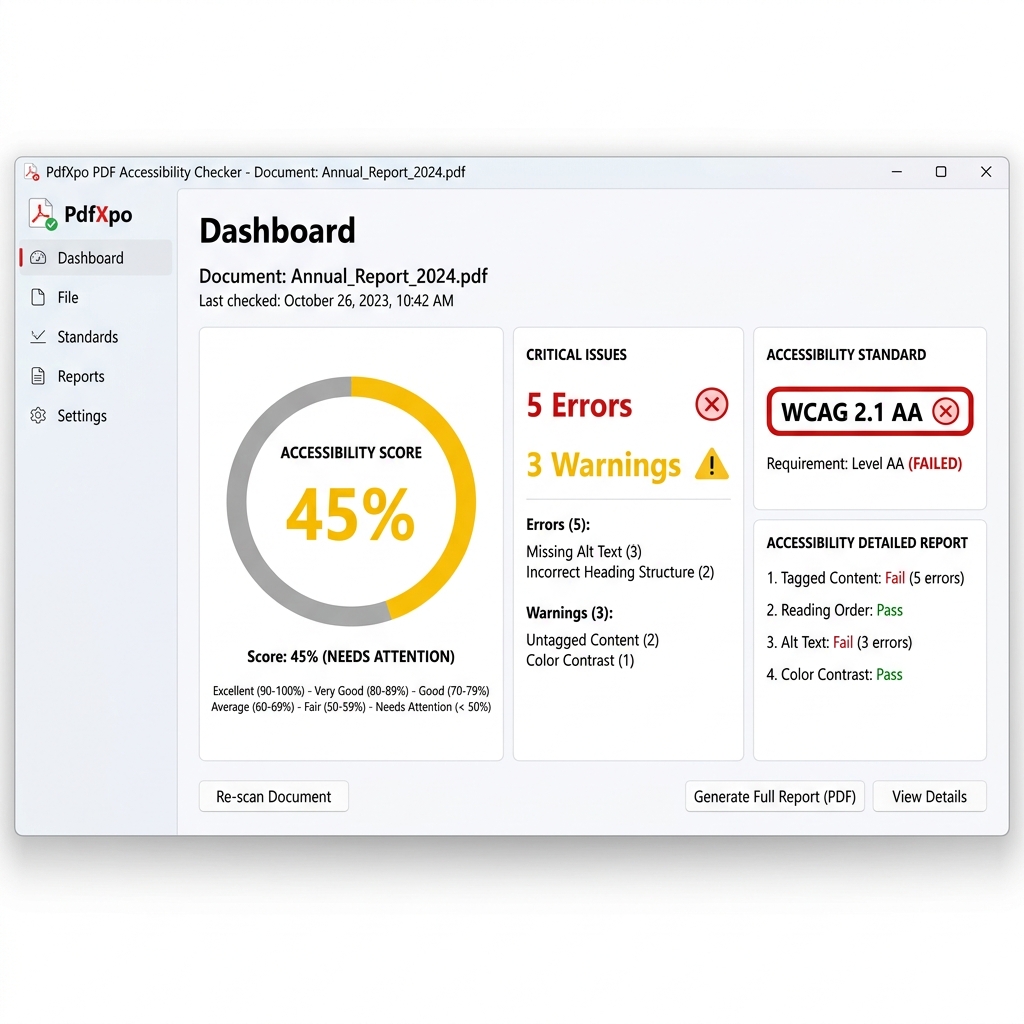
Using the PdfXpo PDF Accessibility Checker, you can instantly audit your files against these critical WCAG criteria. Here is what you need to look for:
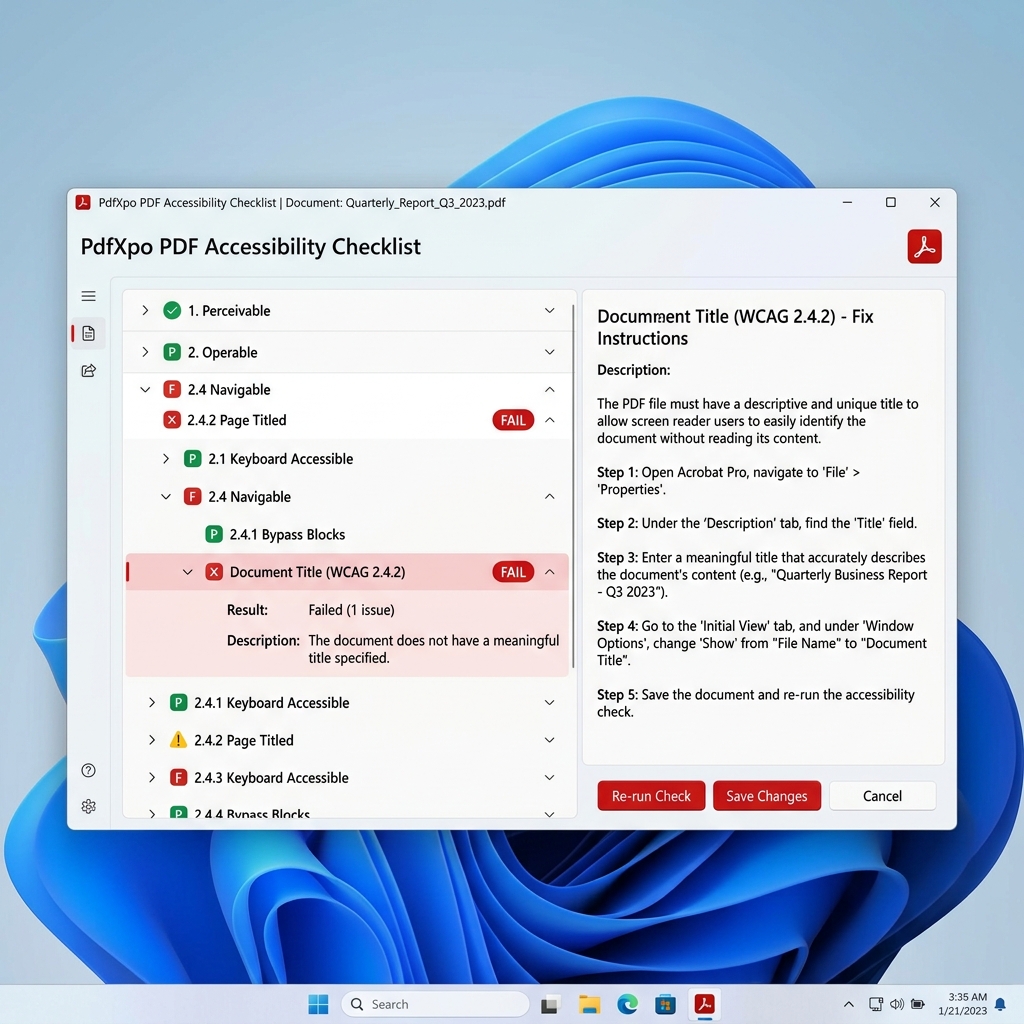
1. Document Title (WCAG 2.4.2)
A screen reader needs to know the name of the document as soon as it opens. Without a metadata title, the screen reader will read the file name (e.g., "final_report_v2_edit.pdf"), which is confusing for the user.
2. Document Language (WCAG 3.1.1)
Screen readers need to know which language synthesizer to use. If a document is in Spanish but labeled as English, the screen reader will try to "pronounce" the Spanish words using English phonetics, resulting in gibberish.
3. Tagged PDF / Structure (WCAG 1.3.1)
This is the most critical check. "Tags" provide the "bones" of the document. Without tags, a screen reader sees a PDF as a flat image or a chaotic stream of characters.
4. Text Selectability & OCR (WCAG 1.4.5)
A scanned PDF is just a "picture" of text. Since there are no real characters, a screen reader has nothing to read. This is a complete block for accessibility.
5. Alt Text for Images (WCAG 1.1.1)
People with visual impairments cannot "see" images. You must provide a text equivalent (Alt Text) that describes the content and purpose of the image.
6. Bookmarks for Long Documents (WCAG 2.4.5)
For any document over 20 pages, bookmarks are essential for navigation. They act as a digital Table of Contents that users can jump to without scrolling through the entire file.
7. Logical Reading Order (WCAG 1.3.2)
If your document has columns, sidebars, or callout boxes, the "visual" order might be different from the "tag" order. A screen reader might read the first half of column one, then jump to the sidebar, then go back to the second half of column one.
How to Conduct a PDF Accessibility Audit
Auditing thousands of legacy PDFs can feel overwhelming. I recommend a "Risk-Based" approach to meet the 2026 deadline:
1. Inventory Your Files: Find every PDF hosted on your public-facing website.
2. Filter by Recency and Impact: Focus first on documents uploaded in the last 2 years and high-traffic documents (e.g., application forms, handbooks, policy manuals).
3. Run Automated Scans: Use the PdfXpo Accessibility Checker to get an instant baseline score. This tool runs entirely in your browser, so you can audit sensitive data securely without uploading it to a cloud.
4. Download Audit Reports: For each file, generate a PDF report of the errors. Use these reports to assign work to your remediation team.
5. Manual Verification: Automated tools only catch about 70% of issues. You still need a human to check if Alt Text is actually *descriptive* and if the reading order makes sense.
High-Volume Fixes: OCR and Metadata
The two most common reasons for an accessibility "FAIL" are Scanned Documents and Missing Metadata.
If you have a backlog of scanned archives, the OCR PDF tool is your best friend. It converts "dead" pixels into live text. Once the text is live, you can use the Edit Metadata tool to set titles and languages across your entire library.
For large organizations, these "Quick Fixes" can raise your overall compliance score from 20% to 60% in a single day, buying you time to handle the more complex "Tagging" and "Alt Text" remediation.
FAQ
Q: What is the ADA PDF accessibility deadline?
A: By April 24, 2026, all US public entities serving populations over 50,000 must ensure their PDFs comply with WCAG 2.1 Level AA. Smaller entities have until April 24, 2027.
Q: What is a "Tagged" PDF?
A: A Tagged PDF contains a hidden layer of metadata that identifies elements like headings, paragraphs, and tables. This "Tag tree" allows screen readers to understand the structure and reading order of the document.
Q: Is there a free PDF accessibility checker?
A: Yes. PdfXpo offers a free, browser-based checker that audits your files against WCAG 2.1, Section 508, and PDF/UA standards without requiring an upload.
Q: How do I fix a PDF that isn't selectable?
A: Scanned PDFs must be processed with Optical Character Recognition (OCR). You can use the PdfXpo OCR tool to transform the image into searchable and accessible text.
Q: Why is Alt Text important?
A: Alternative Text (Alt Text) describes the contents of an image to users who cannot see it. It is a mandatory requirement for WCAG compliance.
---
Conclusion: Act Now, Before the Deadline
The 2026 ADA deadline is not a suggestion — it is a hard requirement that carries real legal consequences. By beginning your audit process today using free tools like the PdfXpo Accessibility Checker, you can identify your highest-risk documents and start remediation before the surge of lawsuits begins.
Don't wait until April 2026. Start your audit today.