How to Merge PDF Files Securely in 2026 — No Upload, Free, Instant
Every time you use an online PDF merger, you are uploading your documents to a server owned by a company you know nothing about. Your contract, your financial statement, your client proposal — sitting on their infrastructure, processed by their software, stored in their logs. For most free tools, this is how they pay for the service. Your data is the product.
In 2026 this is no longer necessary. Modern browser technology means PDF merging can happen entirely on your own device — no upload, no server, no exposure. This guide explains how to merge PDF files securely and why the method you choose matters more than most people realise.
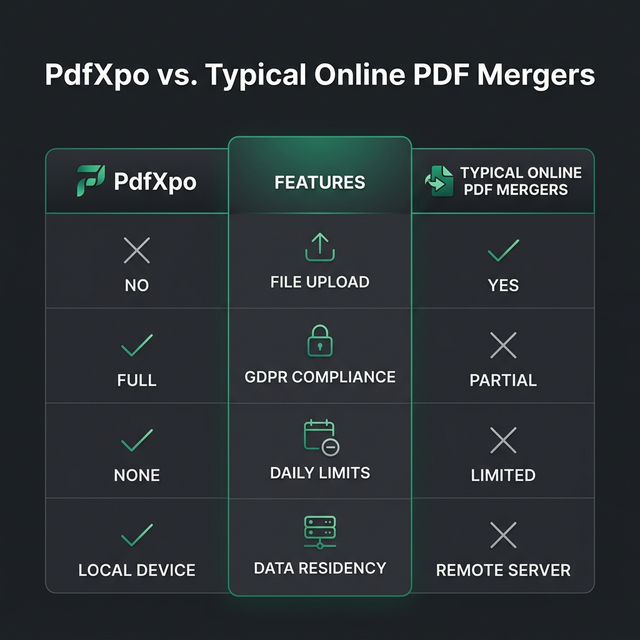
WHY MOST PDF MERGING TOOLS ARE A PRIVACY RISK
The majority of free online PDF tools — iLovePDF, Smallpdf, PDF24, and dozens of others — work the same way. You upload your files to their servers. Their server processes the files. You download the result. The upload happens whether you want it to or not.
This creates real risks that most users never consider:
Data residency
When your file lands on their server, you have no control over where that server is located. A US-based tool may store your data in servers across multiple countries. For documents subject to GDPR, HIPAA, or any jurisdiction-specific data law, this is a genuine compliance issue.
Storage duration
Many free tools store your files for 'a few hours for your convenience.' Some store them longer. Their privacy policy tells you the official position — but logs, backups, and caches often exist beyond what the policy describes.
Encryption in transit
Most tools use HTTPS, which means your file is encrypted between your browser and their server. But once it arrives at their server, it is decrypted for processing. The encryption protects the journey, not the destination.
Who else has access
Free tools are often operated by small teams with minimal security infrastructure. A data breach at a PDF tool company would expose every document processed on their platform. This has happened before in the industry.
THE SECURE WAY TO MERGE PDF FILES
Client-side merging eliminates all of these risks by moving the entire process to your device. PdfXpo's Merge PDF tool uses WebAssembly technology — a fast, secure execution environment built into every modern browser — to run the merging engine locally. Your files never travel across a network. They never reach any server. The processing happens inside your browser's isolated memory space.
You can verify this yourself. Open your browser's network inspector (F12 → Network tab) while using PdfXpo to merge a file. You will see zero outbound file transfers. The only network activity is loading the tool itself.
HOW TO MERGE PDF FILES SECURELY — STEP BY STEP
1. Go to pdfxpo.com/merge-pdf
2. Drag your PDF files into the tool — or click to browse. Add as many files as you need.
3. Reorder files by dragging them into the sequence you want
4. Click Merge PDF
5. Download your merged document — processed locally in seconds
No account required. No file size limit. No daily limit. Works on Mac, Windows, iPhone, and Android.
PDFXPO VS OTHER PDF MERGE TOOLS — SECURITY COMPARISON
| Feature | PdfXpo | iLovePDF | Smallpdf | PDF24 |
|---|---|---|---|---|
| Files uploaded to server | No — browser only | Yes | Yes | Yes |
| GDPR compliant for sensitive docs | Yes | Partial | Partial | Partial |
| Free merges per day | Unlimited | 2–3 | 2 | Unlimited (upload) |
| Account required | No | No | No (limited) | No |
| Monthly cost (no limits) | Free forever | €6/month | $12/month | Free (uploads) |
WHEN YOU NEED TO MERGE PDFS — COMMON USE CASES
Legal and contracts
Combining a cover letter, main contract, exhibit A, exhibit B, and signature page into one document before sending to a client. These documents are highly confidential — client-side merging is the only appropriate method.
Financial documents
Merging monthly bank statements, invoices, and receipts for tax filing or audit preparation. Financial documents should never pass through a third-party server unnecessarily.
Academic and research
Combining research papers, appendices, and bibliographies into a single submission document. Students and researchers working with unpublished work need to protect intellectual property.
Job applications
Merging a CV, cover letter, portfolio, and certificates into one professional document. Quick, easy, and the output is ready to attach to any email.
Business reports
Combining slides exported to PDF, financial summaries, and supporting data into a complete board report. Most business reports include confidential commercial data.
TIPS FOR A PERFECT MERGED PDF
FREQUENTLY ASKED QUESTIONS
Q: Is there a limit to how many PDFs I can merge at once?
A: No limit on the number of files or total page count. You can merge 50 files with 1,000 pages if needed. The only constraint is your device's available memory — modern computers handle this easily.
Q: Does merging PDFs reduce quality?
A: No. PdfXpo's merge tool combines the original file data without reprocessing or recompressing images. The output quality is identical to the input files.
Q: Can I merge PDFs that are password protected?
A: You will need to unlock password-protected PDFs before merging. If you know the password, open the file and save it without the password first, then merge.
Q: What happens to my files after merging?
A: Because processing happens in your browser, nothing is stored anywhere after you close the tab. PdfXpo has no record of your files, the content, or the merge operation. Your document exists only on your device.
Q: Can I merge PDFs on my iPhone?
A: Yes. PdfXpo's merge tool works on any modern mobile browser — Safari on iPhone, Chrome on Android. No app installation needed. Performance is fast even on mobile devices.
Q: Does the merged PDF preserve hyperlinks and bookmarks?
A: Yes. Hyperlinks embedded in the original PDFs are preserved in the merged output. Bookmarks from individual files are maintained where the PDF structure supports it.
Written by the PdfXpo Team. PdfXpo is a document intelligence platform built for professionals who handle sensitive documents daily. Our tools combine browser-based privacy with Google Cloud AI intelligence — fast enough for millions of users, private enough for your most confidential files.