How to Flatten a PDF for IRS e-Filing, Court Submissions, and Government Portals (2026)
If you are a tax professional or an attorney, you have likely encountered this 2026 nightmare: You spend hours perfecting a filing, only to have the IRS Modernized e-File (MeF) system or the PACER court portal reject your PDF instantly. The error message usually mentions "Unsupported interactive elements," "Form layers," or "AcroForm detected."
The solution you are told is to "flatten" your PDF. Most people think they know what this means—perhaps just hitting save again—but in the world of high-stakes government filing, flattening is a specific forensic process. If you do it incorrectly, you could submit a document that looks blank to the recipient or loses its digital signature validity.
In this guide, I will explain exactly what flattening is, why the IRS and Federal Courts are obsessed with it, and show you the precise 60-second workflow to fix your interactive PDF for free.
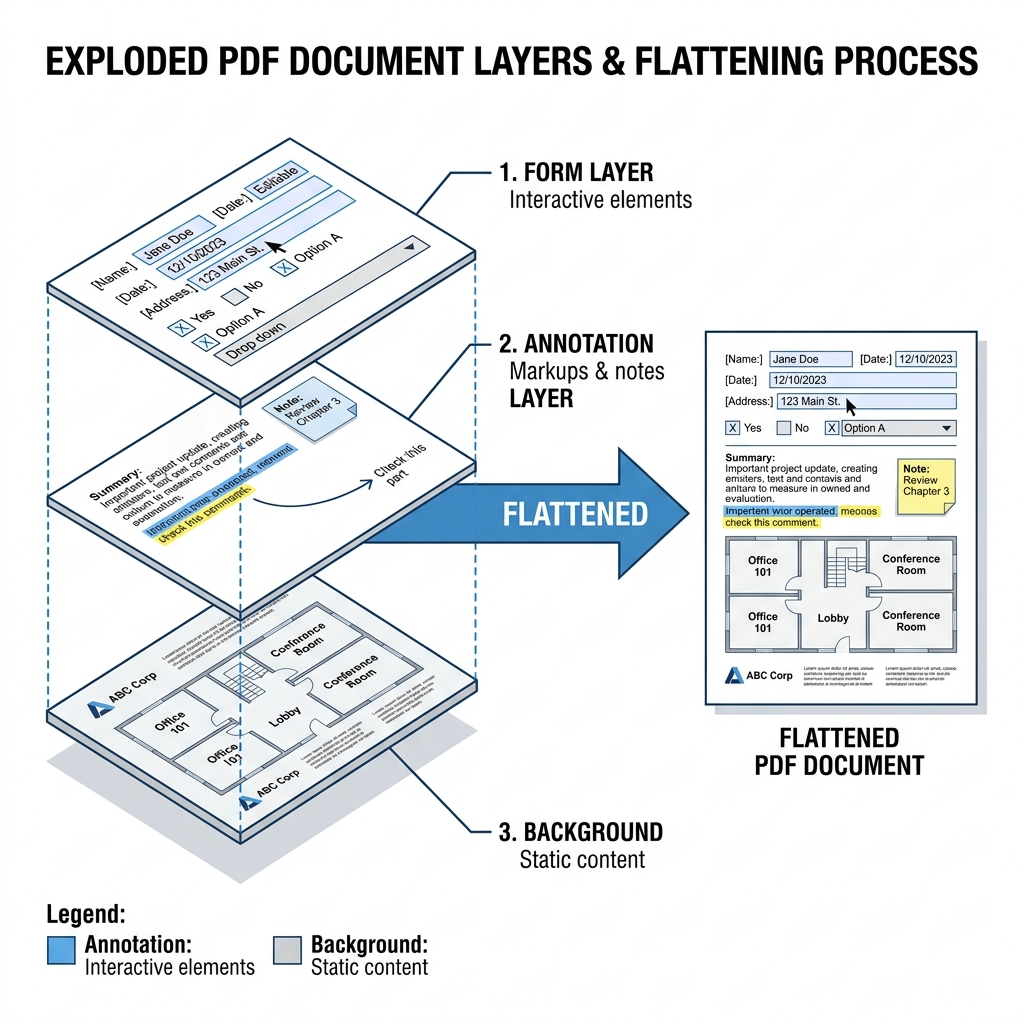
Above: An exploded view of a typical 'interactive' PDF. Government portals require 'Flattening' to merge these layers into a single, static digital image.
What Does "Flatten a PDF" Actually Mean? (Plain English)
A standard PDF is not a single image. It is more like a stack of transparent layers.
When you "Flatten" a PDF, you are merging all these stacks into one single, static background. It is like taking a photocopy of a form that was previously editable. Once flattened, the checkboxes cannot be clicked, and the text boxes cannot be typed into. It is "locked."
The Golden Rule: If you can still click a field or change a checkbox after saving, your PDF is NOT flattened.
Why the IRS MeF System Requires Flattened PDFs (2026)
I have analyzed the current IRS Publication 4164 (Modernized e-File Guide for Developers) and the answer is technical: Stability.
Government systems use automated scripts to "ingest" your data. If your PDF has an active "Form Layer," the IRS's automated script might try to read the "Field Name" instead of the "Data" you typed in. This causes parsing errors.
Furthermore, "Interactive" PDFs are a security risk. They can contain hidden JavaScript or "Actions" that trigger when the document is opened. Government firewalls in 2026 are programmed to reject anything that isn't a static, "flat" file to prevent internal network breaches.
Systems That Require Flattening (2026 Check):
1. IRS MeF System: Mandatory for all attachments (Form 1040, 1120).
2. PACER (Federal Courts): Rejects any document with "unprocessed" annotations to ensure the evidentiary record is immutable.
3. VA Benefits (VBA): Requires flattened medical records to prevent automated decision-making errors.
4. SEC EDGAR: Mandatory for any corporate filing to ensure cross-device consistency.
How to Flatten a PDF Using PdfXpo — Step-by-Step
Our Flatten PDF tool uses a 2026-grade rendering engine that doesn't just "merge" layers—it performs a forensic re-render to ensure every character is pixel-perfect for government systems.
Step 1: Upload Your Interactive PDF
Go to pdfxpo.com/flatten-pdf. Drag in your tax form or court brief. Notice that since this is part of our "Tax Sentinel" suite, we prioritize absolute data privacy. Nothing is ever uploaded to a server—the flattening happens on your local device using WebAssembly.
Step 2: Select Your Flattening Level
Step 3: Download & The "Click Test"
Download your new file. Before you submit it to the portal, perform the "Click Test." Open the file in Chrome or Adobe Reader. Try to click on a field where you entered your Social Security Number or a Signature. If the field doesn't react, you are ready to file!
Comparison: Flatten vs. Compress vs. Optimize
| Feature | Flatten | Compress | Optimize |
|---|---|---|---|
| **Primary Goal** | Remove Interactivity | Reduce File Size | General Cleanup |
| **Why Gov Needs It** | Parsing Stability | Transmission Limit | Security |
| **Does it change text?** | No | Potentially (quality) | No |
| **Impact on Fields** | Fields become static | Fields remain clickable | Fields remain clickable |
Pro Tip: If your IRS return is rejected for being "Too Large" AND having "Interactive Elements," you need to Flatten first, then use the Compress tool second.
Common Problems and Fixes (Flattening)
1. "Wait, I can't edit my form anymore!" — Yes. Flattening is permanent. Always keep a "Master Copy" that is interactive, and use PdfXpo Flatten on a *copy* for submission.
2. "The digital signature disappeared" — This happens if you use a "Print to PDF" method. PdfXpo preserves the *visual* of the signature while removing the interactive layer.
3. "The text became blurry" — You likely used a low-quality web tool. Government portals require high legibility. PdfXpo ensures a minimum of 300 DPI equivalent for all flattened text.
4. "IRS still rejected the file" — Check if you have "metadata" issues. Use the Metadata Scrubber tool as well.
FAQ: Frequently Asked Questions
Does "Print to PDF" flatten a document?
Yes, it does, but with a major downside. Most browser "Print to PDF" engines convert your text into a "flat image," which means the IRS or the court's automated systems won't be able to "search" or "read" the text. Use PdfXpo's Flatten tool to keep your text searchable while removing the form interactivity.
Can I flatten a PDF on a Mac for free?
Yes. While you can use macOS Preview (File > Export as PDF), it often produces files that are too large or have inconsistent layer merging. Using a web-based utility like PdfXpo ensures the output is compatible with the latest Windows-based government systems used by the IRS.
Is it legal to flatten my own tax documents?
Yes. In fact, it is often a requirement. Flattening simply ensures that the document you submit is a "final" version that cannot be altered after the fact.
---
<script type="application/ld+json">
{
"@context": "https://schema.org",
"@type": "FAQPage",
"mainEntity": [
{
"@type": "Question",
"name": "What is a flattened PDF for the IRS?",
"acceptedAnswer": {
"@type": "Answer",
"text": "For IRS e-filing (MeF system), a flattened PDF is a document where interactive form fields and digital signatures have been permanently merged into the background. This prevents automated processing systems from misreading field names instead of the values you entered."
}
},
{
"@type": "Question",
"name": "How do I flatten a PDF for a court portal for free?",
"acceptedAnswer": {
"@type": "Answer",
"text": "To flatten for court portals like PACER, use PdfXpo's 'Flatten PDF' tool. Upload your brief or filing, wait for the processing to finish locally in your browser, and download the resulting static PDF. This ensures the document meets the court's requirement for a non-editable, permanent record."
}
}
]
}
</script>
---
Flatten PDF | Compress PDF | Sign PDF | Protect PDF | Redact PDF