How to Compress PDF and JPG to Exactly 200KB or 500KB for Government Portals
You’ve spent hours filling out your exam application or government job form. You’ve gathered your certificates, scanned your ID, and taken a perfect passport photo. You click "Upload," and then it happens: "Error: File size must be between 10KB and 200KB."
This is one of the most frustrating moments in the digital application process. Most "PDF compressors" only give you generic options like "Good" or "Extreme," leaving you to guess if the result will be 150KB or 250KB. If it’s too small, the quality is blurry; if it’s too large, the website rejects it.
This guide will show you how to use the PdfXpo Compress to Exact Size tool to hit those precise targets every time. Whether you need a 200KB PDF for SSC/UPSC or a 50KB JPG for NEET, we’ve got you covered.
Why Portals Have Strict File Size Limits
Government portals like NEET, SSC, UPSC, KRA (Kenya), JAMB (Nigeria), and CPNS (Indonesia) handle millions of applications every month. To ensure their servers don't crash and to keep page load times fast for users on slow mobile networks, they enforce strict file size limits.
The three most common limits you will encounter are:
The Problem with "Standard" Compression
If you use a standard PDF compressor, it simply applies a set reduction to the overall quality of the images inside the PDF.
How to Compress to a Precise Target Size
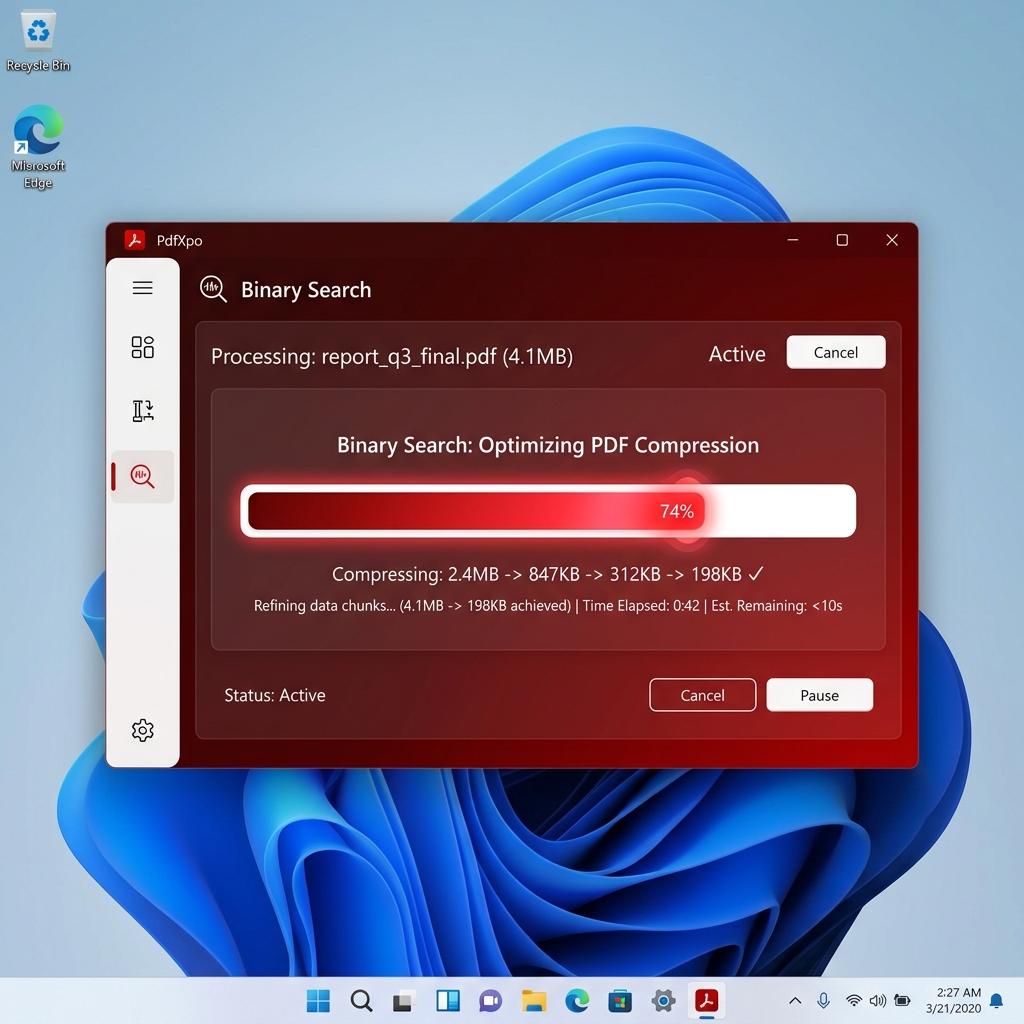
The PdfXpo Compress to Exact Size tool uses a "Binary Search" algorithm. It automatically tries different quality settings and DPI (dots per inch) scales to find the highest possible quality that still sits just below your target limit.
Step-by-Step Instructions:
1. Select Your File: Click the upload area or drag and drop your PDF or image (JPG, PNG, WebP) into the box. If you are on a phone, you can even take a photo of your document directly.
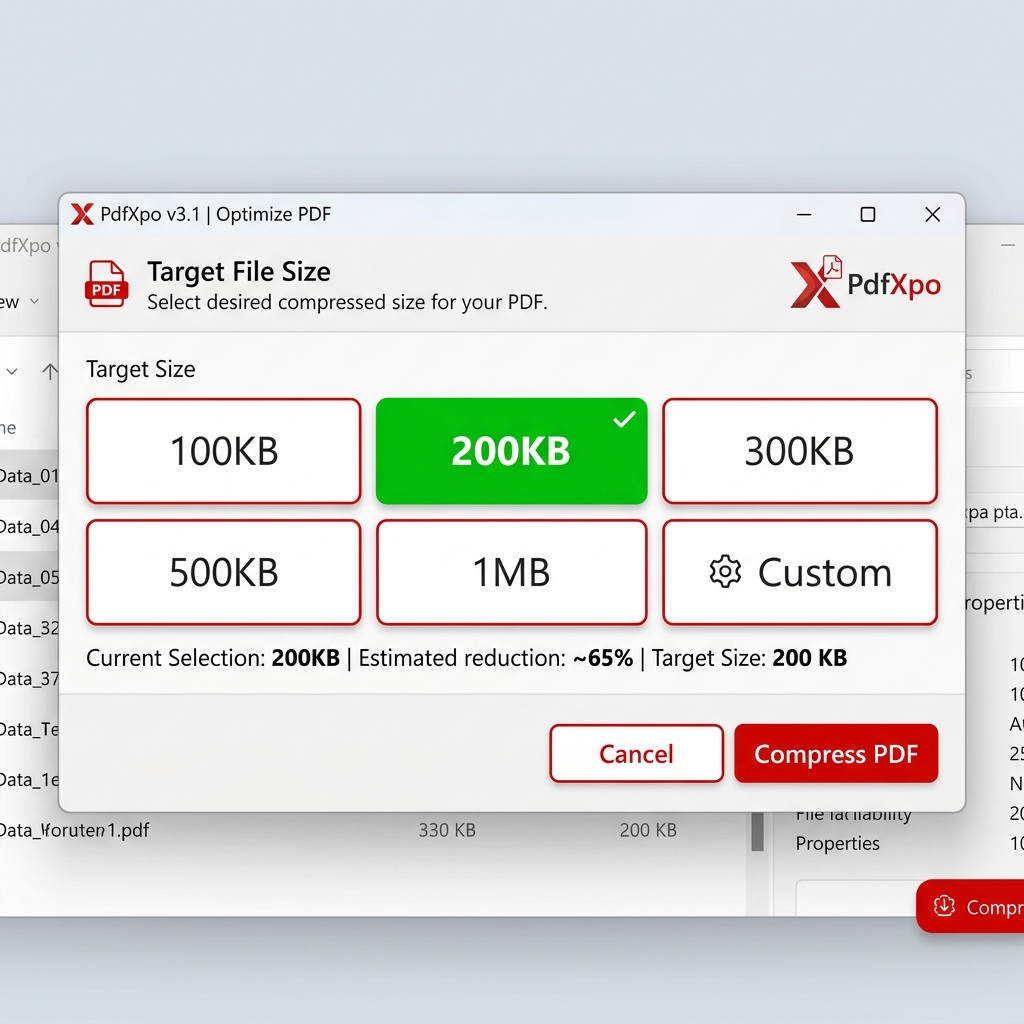
2. Choose Your Target: Use the large preset buttons for the most common limits (100KB, 200KB, 500KB, 1MB).
3. Custom Size: If your portal has a weird requirement (like "Exactly 350KB"), click Custom and type in your value.
4. Click Compress: The tool will begin its intelligent scan. You’ll see the size dropping in real-time as the algorithm "zeroes in" on your target.
5. Download: Once finished, you’ll get a result that is typically within 1-5% of your target (e.g., 198KB for a 200KB limit).
Professional Tips for Exam Applications
When your future depends on an application, you shouldn't take risks with your documents.
1. Document Legibility vs. File Size
The most common reason for rejection is unreadable text. If you compress a document too much, the small print on your marksheet might look like "blobs."
2. Handing "Already Smaller" Files
If your file is already 150KB and the limit is 200KB, do not compress it further. The PdfXpo tool will actually warn you: *"Your file is already smaller than the target!"* This prevents unnecessary quality loss.
3. Combining Photos into a Single PDF
Many portals ask for "A single PDF containing all 10 marksheets, under 1MB."
For Mobile Users
Over 80% of applicants use their phones to apply for exams. Our tool is "Sovereign" — it runs entirely on your phone's processor.
FAQ
Q: How do I compress a PDF to exactly 200KB?
A: Go to pdfxpo.com/compress-pdf-to-exact-size, upload your PDF, select the 200KB button, and click Compress. The tool will adjust quality to hit that size precisely.
Q: Can I compress a photo (JPG) to a specific size?
A: Yes. The tool accepts JPG, PNG, and WebP images. Simply upload your photo and set the target size (e.g., 50KB for a passport photo).
Q: Why did my compression fail?
A: If a document is very large (e.g., 20 pages of high-res photos) and you try to compress it to 100KB, the quality might drop so low that the text disappears. The tool has safety limits to prevent "garbage" results. In this case, try a slightly larger target.
Q: Is this tool free?
A: Yes, it is completely free, unlimited, and requires no signup.
---
Conclusion
Don't let a "File Too Large" error stop you from submitting your application on time. With the PdfXpo Compress to Exact Size tool, you have the precision you need to meet any portal requirement while keeping your documents professional and readable.
Ready to submit? [Check your file size now](https://pdfxpo.com/compress-pdf-to-exact-size).